
 Back to Newsboard
Preparing a detailed project estimate is essential for accurate costing, but clients often require a simple quotation rather than a full Bill of Quantities. With EJM Software, you don't need to recreate the information manually.
Using the Create Quote feature, you can quickly generate a professional quotation directly from your project estimate.
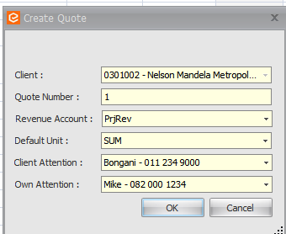
To access this feature, open your Project, navigate to Bill of Quantity, select the Reports tab, and click Create Quote. Simply complete the required client quotation details, and EJM will generate a client-ready quotation based on your project data.

Why use Create Quote?
Whether you're pricing a small project or a large tender, the Create Quote feature streamlines the quoting process, allowing you to respond to clients faster while maintaining accuracy.
.jpg)