
 Back to Newsboard
Simply upload the relevant Company Policies in the Company Information and these will appear in the Employee Self Service for employees to review.
To upload Company Policies, select Company Information from the General menu on the top ribbon and then click on Company Policies. Then click on Click here to add a new row. A pop-up screen will appear. Fill in the policy Description; select the policy Status and the Effective Date.
Then click on the ... to select the attachment you'd like to include, and click on the ... in the Attachment pop-up screen to locate the desired pdf file. The Extension will fill in automatically. Add a Comment if you wish and then click Save And Close and then Accept And Close to load the Company Policy. The company policy will be saved and loaded onto the ESS once Save And Close has been clicked on the Company Information screen.

When employees log into the Employee Self Service they will receive a notification that a new Company Policy has been added for review. Employees can View Policy Doc, Accept, Decline or Review Later.
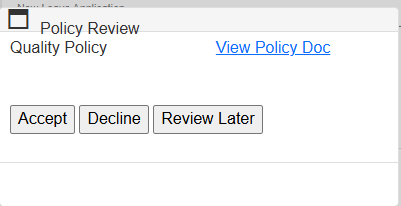
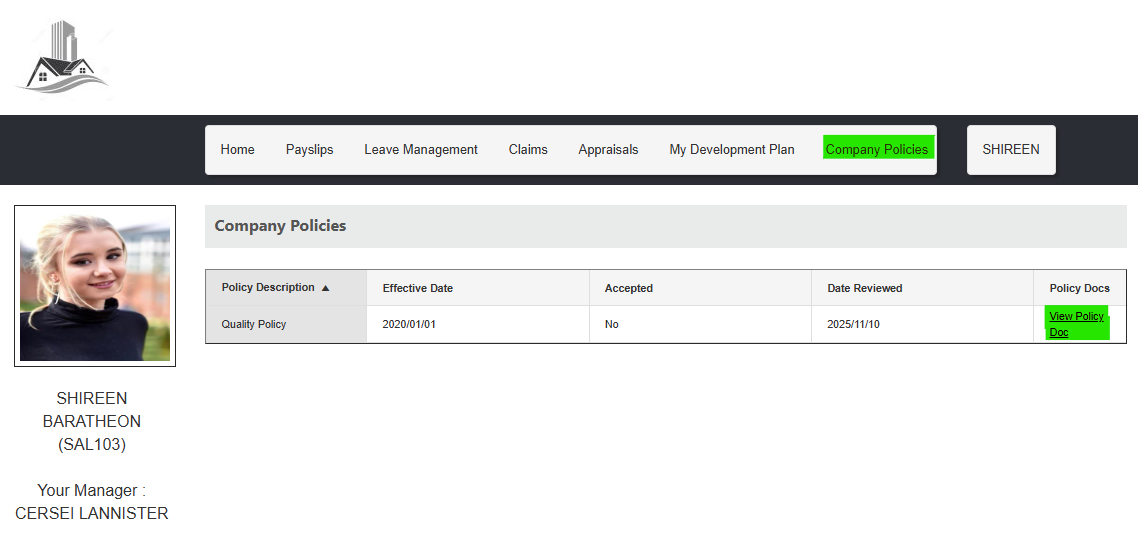
Should employees wish to view the company policy at a later stage, it can be found under the Company Policies tab in their ESS profile. Whether or not the policy has been Accepted will also be displayed.
Should you have any questions about this feature, or wish to enquire about the ESS Module, please get touch. We'd be happy to assist.
.jpg)