
 Back to Newsboard
Keeping resource rates up to date is essential for producing accurate estimates and managing project costs. Rather than updating each resource individually, EJM Software allows you to increase multiple resource rates in one simple process.
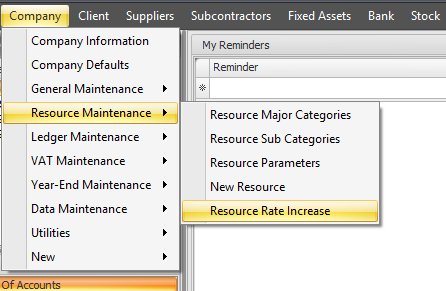
To access this feature, navigate to Company > Resource Maintenance> Resource Rate Increase.
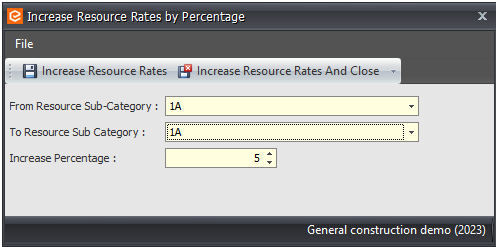
Simply select the From Resource Sub-Category and To Resource Sub-Category to define the range of resources you want to update. Then enter the percentage increase to be applied. EJM will automatically update the rates for all resources within the selected range, saving valuable time and ensuring consistency across your resource database.
Why use this feature?
Whether you're applying annual wage rate adjustments, supplier price increases, or other cost changes, the Resource Rate Increase feature provides a fast and reliable way to keep your resource rates current.
.jpg)